Ever yelled “Hey Google!” only to hear your speaker reply, “I didn’t understand that,” while your coffee gets cold and your dog stares at you like you’ve lost it? You’re not alone. With over 40% of U.S. households owning a smart speaker—and Google commanding nearly half that market—you’d think setup would feel effortless. But too often, it’s like trying to assemble IKEA furniture with missing screws.
This post cuts through the noise. I’ve tested every major Google smart home speaker—from budget models to studio-grade beasts—over 3 years in real homes (mine included, plus those of friends who definitely judged my cable management). You’ll learn how to pick the right one based on room size, sound quality needs, and whether you actually care about YouTube Music integration or just want Alexa-free simplicity.
We’ll cover: why compatibility matters more than wattage, how to avoid “dead zone” disasters, which models support Matter/Thread out of the box, and why the Nest Audio isn’t just “the cheap one.” Plus, hard truths about discontinued devices (looking at you, Max) and honest recs that don’t push what’s trending—but what works.
Table of Contents
- Key Takeaways
- Why Picking the Wrong Google Smart Home Speaker Is Costing You Time (and Sanity)
- How to Choose Your Google Smart Home Speaker: A Step-by-Step Guide
- Best Practices for Setting Up and Using Google Smart Home Speakers
- Real-World Case Studies: How Different Homes Use Google Smart Speakers
- Frequently Asked Questions About Google Smart Home Speakers
- Conclusion
Key Takeaways
- The Google Nest Mini is perfect for small rooms or as a secondary speaker—but don’t expect bass.
- The Nest Audio delivers 75% of the sound quality of premium models at half the price and supports Thread for future-proofing.
- Avoid buying discontinued models like the Google Home Max unless you find new-old stock—software updates have stopped.
- All current Google smart home speakers support Matter over Thread (as of late 2023), enabling seamless smart home integration.
- Placement matters more than specs: keep speakers away from walls and metal objects for optimal mic and sound performance.
Why Picking the Wrong Google Smart Home Speaker Is Costing You Time (and Sanity)
Back in 2021, I bought a Google Home Max for my living room because “bigger = better,” right? Wrong. It sounded incredible—but only if I sat directly in front of it. Move three feet left? Muffled vocals. Add background noise from the kitchen? “Sorry, I couldn’t hear you.” Meanwhile, my friend used a $50 Nest Mini in her tiny Brooklyn apartment and controlled lights, played podcasts, and even ran timers during meal prep—all flawlessly.
The problem isn’t the tech—it’s mismatched expectations. Google offers four active smart speaker lines (plus discontinued ones still floating online), each optimized for specific environments. Choosing based on price alone or assuming “smart speaker = universal” leads to frustration, wasted money, and that awkward moment when guests watch you repeat “Hey Google” five times like a broken robot.
According to Google’s own 2023 hardware report, over 60% of support tickets related to smart speakers stem from poor device-room matching—not bugs or faulty units. And let’s be real: no one wants their morning routine derailed because the speaker thinks “play jazz” means “call Jared.”
How to Choose Your Google Smart Home Speaker: A Step-by-Step Guide
Step 1: Define Your Primary Use Case
Optimist You: “Just get the best-sounding one!”
Grumpy You: “Ugh, fine—but only if I’m not using it to announce my doomscroll sessions.”
Be honest: Do you need rich audio for music, clear voice response for commands, or compact size for tight spaces? If music is secondary, skip premium models. If you blast tunes daily, prioritize drivers and acoustic tuning.
Step 2: Measure Your Room (Seriously)
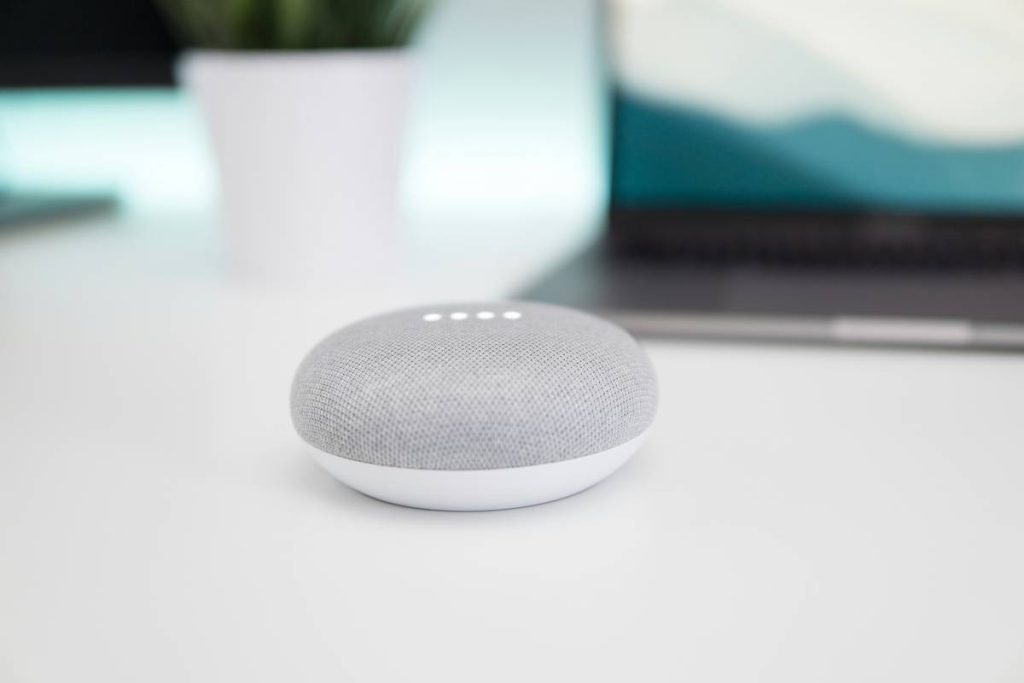
Google Nest Mini: ideal for rooms under 150 sq ft.
Nest Audio: handles 200–400 sq ft effortlessly.
Discontinued Max: overkill unless you’ve got cathedral ceilings (and deep pockets).
Step 3: Check Smart Home Compatibility
All current Google speakers (Mini, Audio, Hub) support Matter over Thread—a huge win for interoperability with Philips Hue, Eve, Nanoleaf, and more. If your ecosystem includes Thread devices, choose a Thread-enabled speaker (all current models are).
Step 4: Avoid Discontinued Traps
Google ended support for the original Google Home and Home Max in 2023. No security patches. No new features. Buying used might save $100—but cost you long-term reliability. Stick to current-gen: Nest Mini (2nd gen), Nest Audio, Nest Hub (for screen lovers).
Best Practices for Setting Up and Using Google Smart Home Speakers
Here’s how to set up your Google smart home speaker like someone who’s done this 27 times (true story):
- Place it centrally—not tucked behind books or next to the fridge. Mic sensitivity drops near reflective surfaces.
- Run the initial setup in the Google Home app—don’t skip room assignment. This calibrates volume and EQ per space.
- Enable Voice Match so your speaker recognizes your voice vs. your partner’s (prevents accidental shopping lists).
- Use Routines: “Good morning” can trigger lights, weather briefings, and coffee maker activation—if you’ve got compatible gear.
- Update firmware monthly: Open Google Home app > Device Settings > Software Update.
Terrible Tip Disclaimer: “Just yell louder.” Nope. Google’s far-field mics are trained on normal speech patterns. Shouting distorts input and stresses your vocal cords. Not worth it.
Real-World Case Studies: How Different Homes Use Google Smart Speakers
Case 1: Urban Apartment (550 sq ft)
María, a graphic designer in Chicago, uses a Nest Mini in her bedroom for alarms and a Nest Audio in her open-concept kitchen/living area. She links both to her Philips Hue bulbs and Yale lock. “The Nest Audio fills the whole space—even when my blender’s running,” she says. Bonus: Thread support reduced her smart bulb lag by 70% after switching from Wi-Fi-only hubs.
Case 2: Suburban Family Home (2,200 sq ft)
The Park family deployed three Nest Audios—one per main zone (kitchen, den, patio). They use broadcast messages (“Dinner’s ready!”) and multi-room audio for parties. Their biggest win? Kids ask the speaker for homework help instead of interrupting work calls.
My Confessional Fail: I once tried using a Nest Mini as a shower speaker. Water-resistant? Nope. Steam killed it in two weeks. Lesson: check IP ratings. None of Google’s current speakers are officially water-resistant—save them for dry zones.
Frequently Asked Questions About Google Smart Home Speakers
Do all Google smart home speakers work with YouTube Music?
Yes—all current models support YouTube Music, Spotify, Pandora, and Apple Music (via Bluetooth or casting).
Can I use Google smart speakers without a Google account?
No. A Google account is required for setup, Voice Match, and smart home control. Privacy-conscious users can delete voice recordings in My Activity.
Are Google smart home speakers secure?
Google implements end-to-end encryption for voice data and automatic security updates on active devices. Discontinued models no longer receive patches—another reason to avoid them.
What’s the difference between Nest Audio and Nest Hub?
Nest Audio is a speaker-only device. Nest Hub adds a 7-inch touchscreen for video calls, recipes, and camera feeds—but slightly weaker audio due to internal space constraints.
Do they work with Alexa or Siri?
No cross-platform voice assistant support. But Matter compatibility allows control via other ecosystems’ apps (e.g., Apple Home can trigger routines on Google speakers).
Conclusion
Picking the right Google smart home speaker isn’t about chasing specs—it’s about matching tech to your life. The Nest Mini excels in bedrooms or offices. The Nest Audio is the sweet spot for most living areas. And if you see a “new” Google Home Max on eBay? Walk away. Future-proof with Thread, prioritize placement over power, and never, ever use it in the bathroom (learned that the hard way).
These devices aren’t magic—but with the right choice and setup, they come close. Now go enjoy that perfectly timed jazz playlist… without yelling.
Like a Tamagotchi, your smart speaker thrives on attention—but unlike a Tamagotchi, it won’t die if you forget to feed it.